
Turbo AI vs. StudyFetch

Ishan Chawla
Student, Northwestern University

Brief Overview
Hi, I’m Ishan, a Northwestern student who uses AI tools every day. I decided to put two widely discussed platforms head to head. This article breaks down the strengths and shortcomings of both tools.
I. The Motivation
You’ve seen both all over social media. And now you’re wondering: Turbo or StudyFetch?
These tools promise to make school easier with notes, flashcards, quizzes, and AI tutors. But are they actually good? Are they worth paying for?
To be completely transparent, I work at Turbo AI, but I went into this with a clean slate. The article contains no sales pitches or buzzwords. Only hands-on testing with college-level material. What follows is a breakdown of where each platform performs well, where each falls short, and which one I’d actually spend money on again.
II. Test Setup
To keep things fair, I uploaded the same material to both Turbo and StudyFetch, including:
- Chemistry: A dense 40-minute YouTube lecture introducing organic chemistry
- Computer Science: Audio recording of a lecture from my course covering the basics of TypeScript in React
- Economics: Lecture slides from a high-level, math-heavy undergraduate course in econometrics
- Legal Studies: An easy set of three short case summaries, 900 words each, formatted as a six-page, easy-to-read PDF
- Legal Studies: The Supreme Court ruling in NFIB v. Sebelius (2012), a complex 193-page PDF
I tested both tools on desktop and mobile, focusing on the quality of each platform’s output.
III. User Interface (UI) & Ease of Use
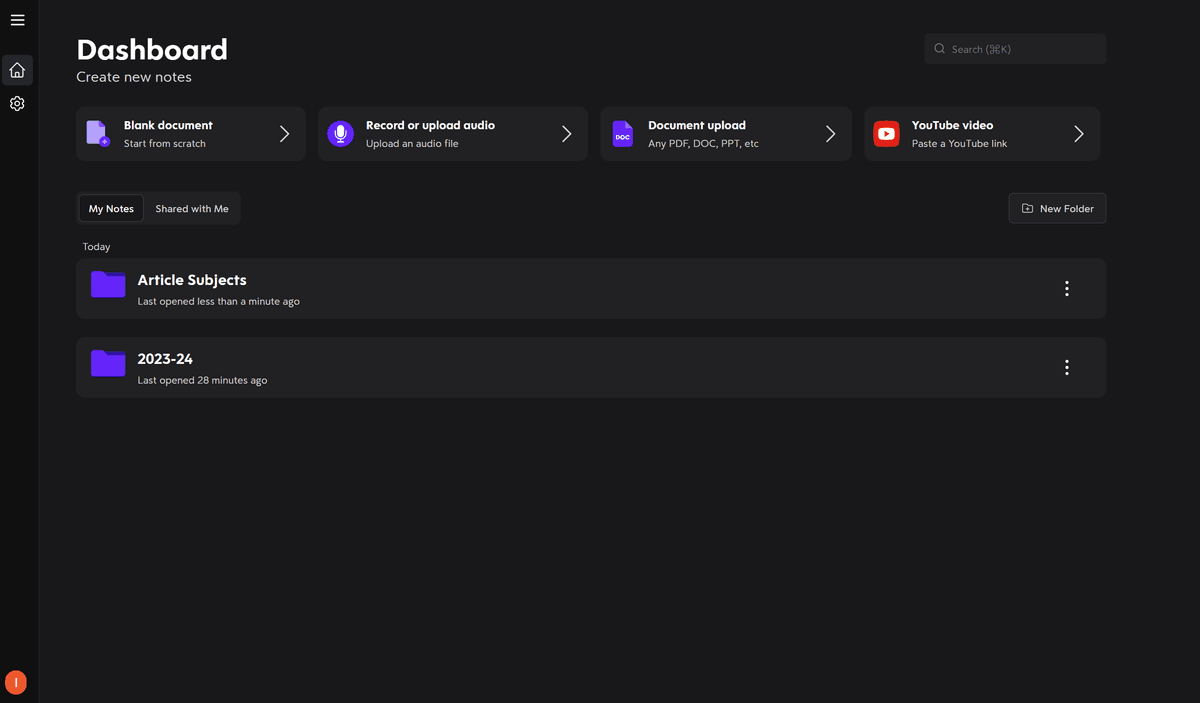
Upon entering Turbo, I knew where to go. The dashboard feels clean, with a simple sidebar and a central workspace. StudyFetch takes a bit longer to get a hold of with an extremely detailed interface.
Uploading a PDF required just 2 clicks on Turbo, but 6 clicks and toggling 4 different dropdowns on StudyFetch.
Turbo's Dashboard
StudyFetch's Dashboard
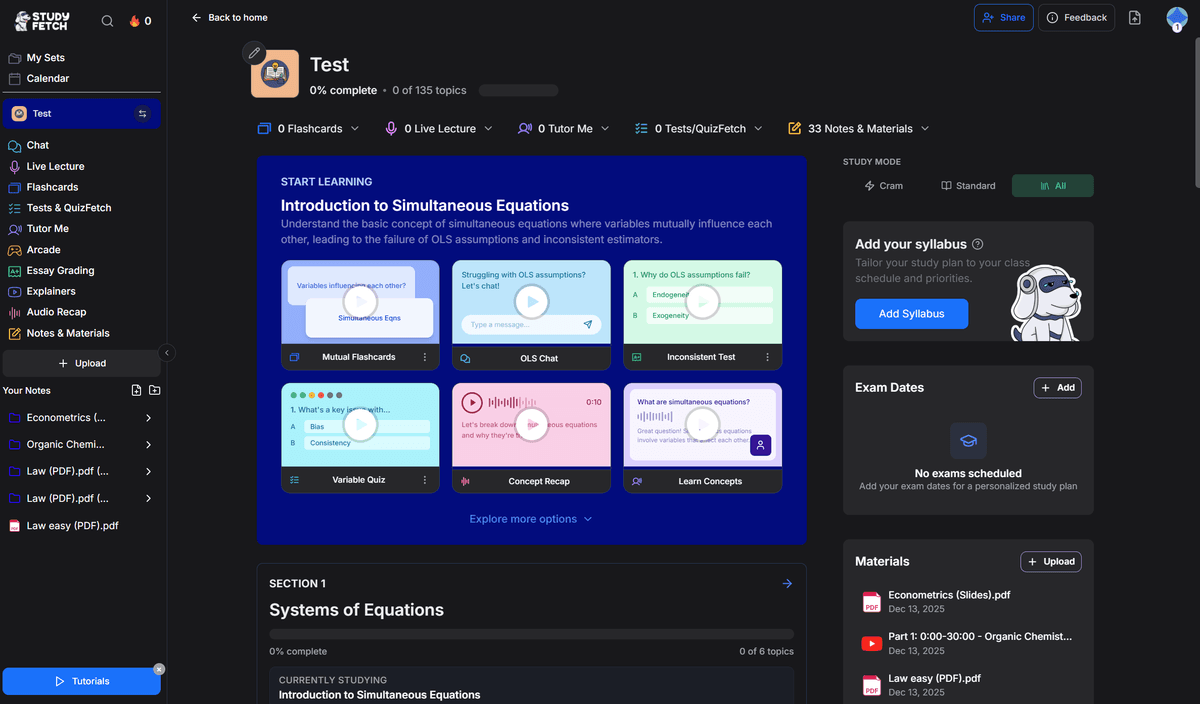
Both Turbo and StudyFetch also offer mobile platforms mirroring their web versions but Turbo's interface seems more minimalist and user-friendly.
Turbo's Mobile UI

StudyFetch's Mobile UI

Verdict: Turbo wins in this category.
IV. Note Quality & Accuracy
Onto the main feature of both tools: how well these tools summarize and organize study material. The layouts look similar, except StudyFetch's UI also features the uploaded material itself while Turbo prioritizes white space.
Computer Science Lecture Audio Recording
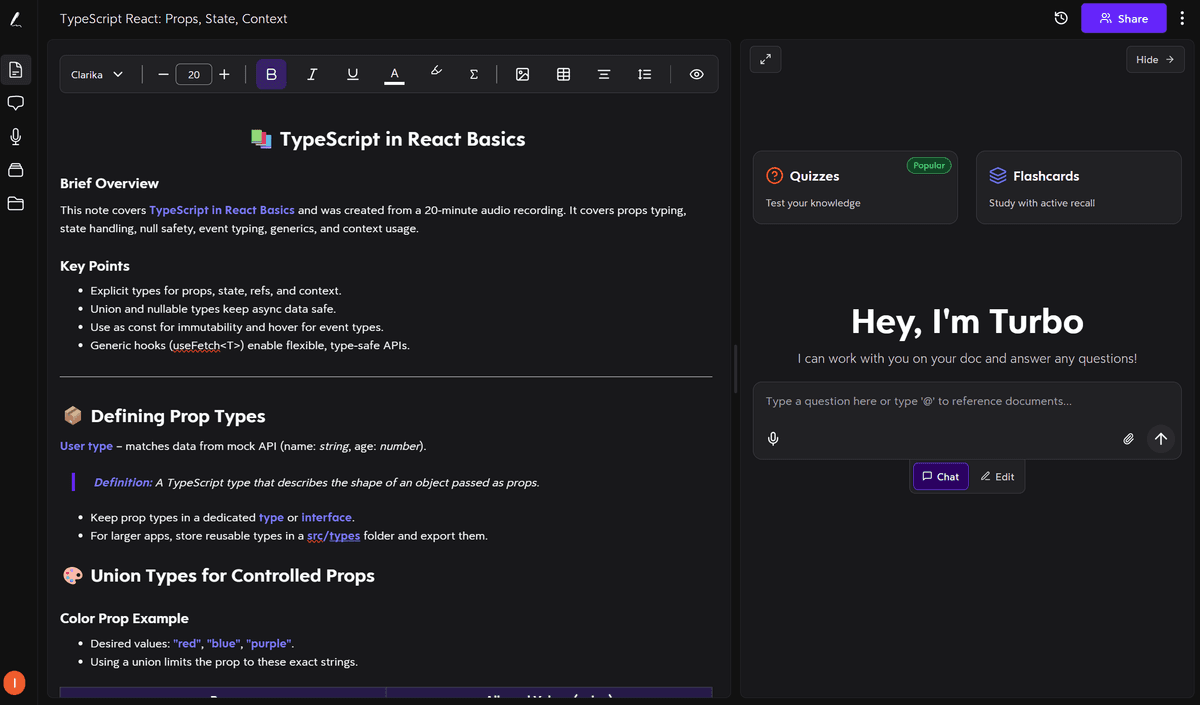
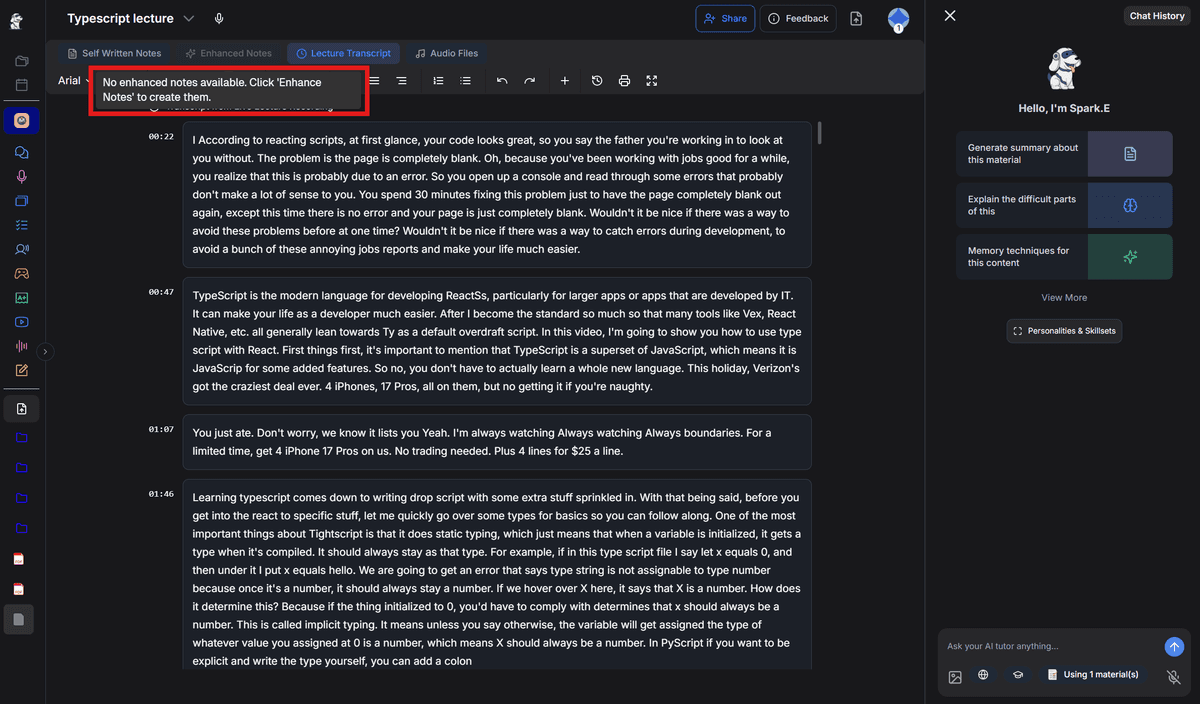
For this, I used the mobile version of both tools. The note quality was comparable, but the cross-device experience differed.
- Turbo synced immediately and I accessed the AI-generated notes from my desktop.
- With StudyFetch, I could not access the generated notes on desktop. Instead, I was able to access only the transcript. The desktop version displayed "No enhanced notes available. Click 'enhance notes' to create them," yet no "enhance notes" button appeared.
Turbo Notes
StudyFetch Notes
I looked into StudyFetch's reviews, and it seems these technical glitches are common. One user purchased StudyFetch for her daughter and claimed:
"My daughter used for a few months and after spending hours creating study content the app glitched and she lost all her information."
— Heather, Oct 3, 2025
Another StudyFetch user said:
"its unreliable and full of bugs. Some of my files disappeared during the exam period ... So dont ever use this app for notetaking"
— Jasmin, Oct 1, 2025
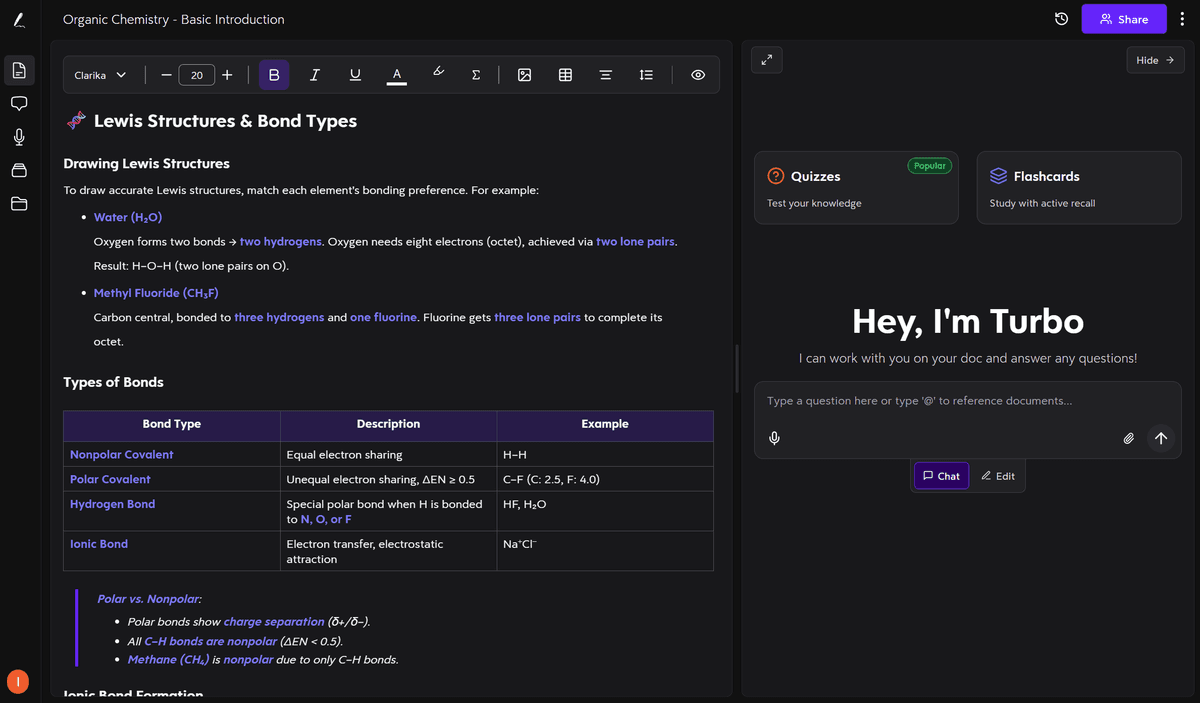
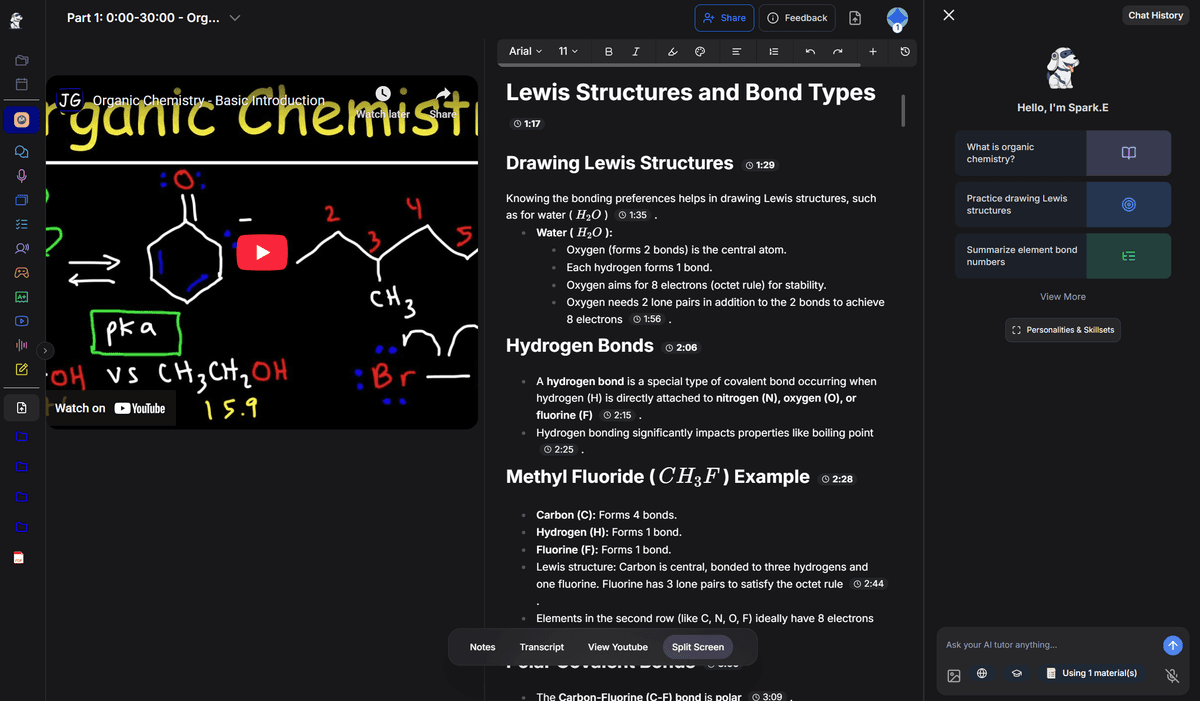
Organic Chemistry YouTube Lecture
The notes from Turbo and StudyFetch were relatively similar, except StudyFetch included timestamps on each line, which helps when returning to specific clips.
Turbo Notes
StudyFetch Notes
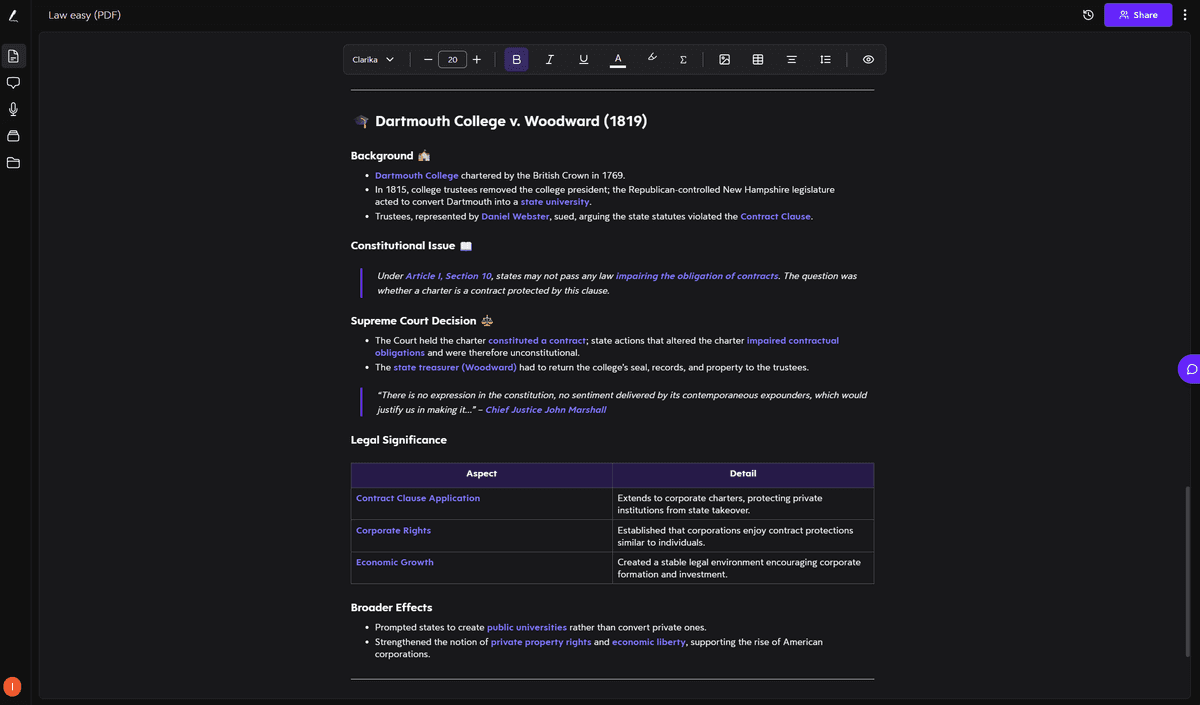
Easy Constitutional Law PDF
- Turbo: Delivered true notes with succinct bullet points divided into key sections
- StudyFetch: Generated large blocks of text. In some sections, the notes were longer and wordier than the original material. It felt like the tool was almost rewriting certain parts instead of summarizing.
Turbo Notes
StudyFetch Notes
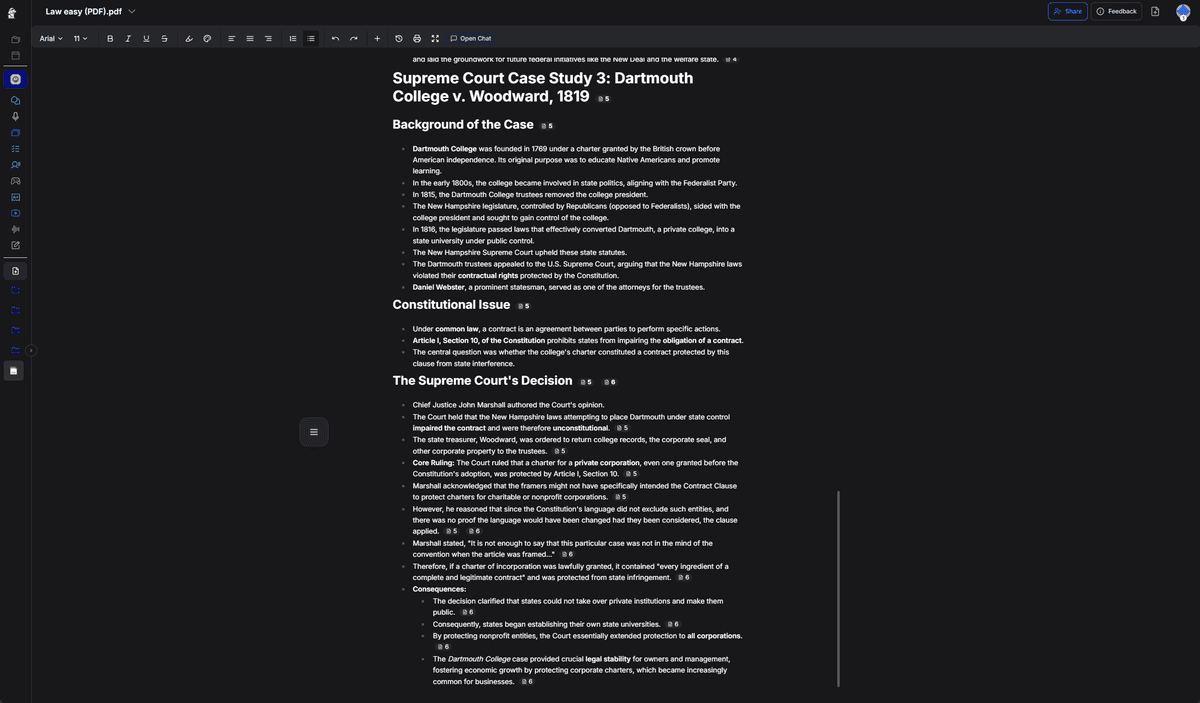
When articulating the Supreme Court's decision, for example, Turbo summarized the takeaways in two succinct bullet points. StudyFetch, on the other hand, repeats Justice Marshall's line of reasoning but leaves out context such as who the "framers" were or the role of nonprofit organizations.
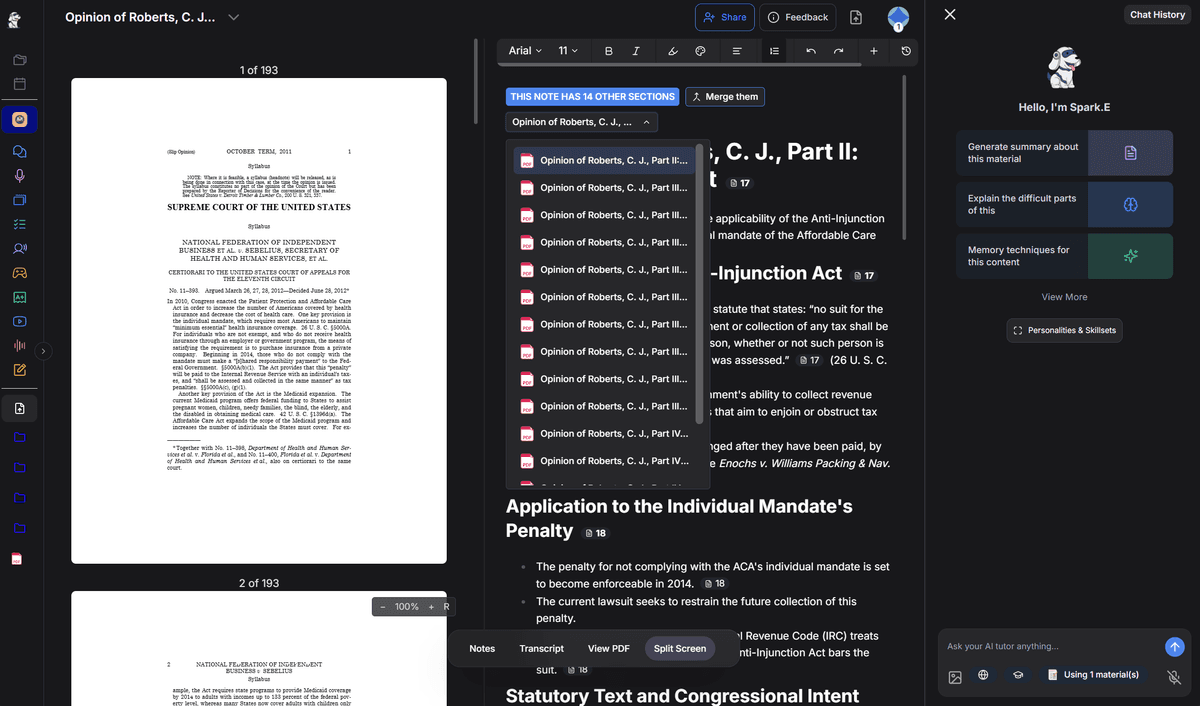
Difficult Constitutional Law PDF
This was assigned for one of my legal studies courses and is brutal to read. It contains several court opinions, complex constitutional arguments, and dense legal jargon drawing on precedent and intricate applications of tax law.
Turbo:
- Broke down each section of the case into digestible notes
- Correctly summarized both the Commerce Clause and Taxing Power arguments
- Included direct callouts for precedents and case impact
StudyFetch:
- Labeled every section "Opinion of John Roberts" even when quoting other justices (???)
- Skipped several key sections entirely, including the part on state coercion via Medicaid funding
Turbo Notes

StudyFetch Notes
Econometrics: Lecture Slides
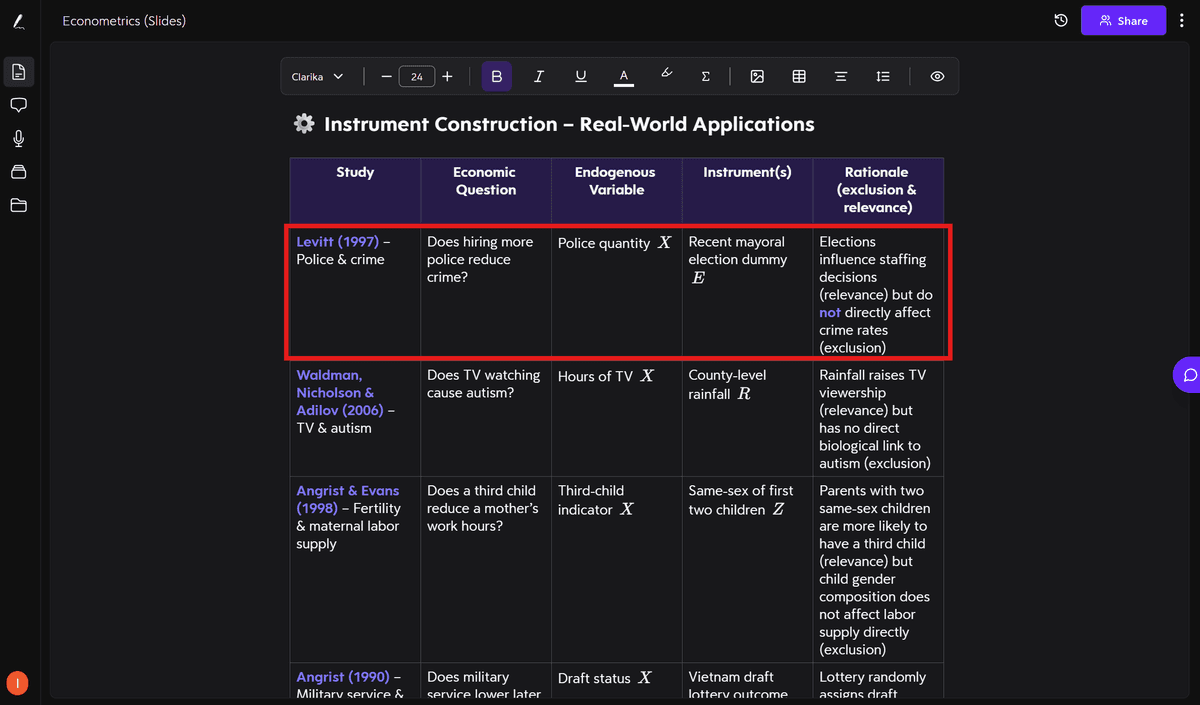
Turbo:
- Recognized and explained formulas
- Included diagrams, tables, and example breakdowns
- Connected concepts (e.g., multicollinearity, heteroskedasticity)
StudyFetch:
- Missed equations altogether in the second half of the slides
- Failed to capture visual examples or tables
Turbo Notes
StudyFetch Notes
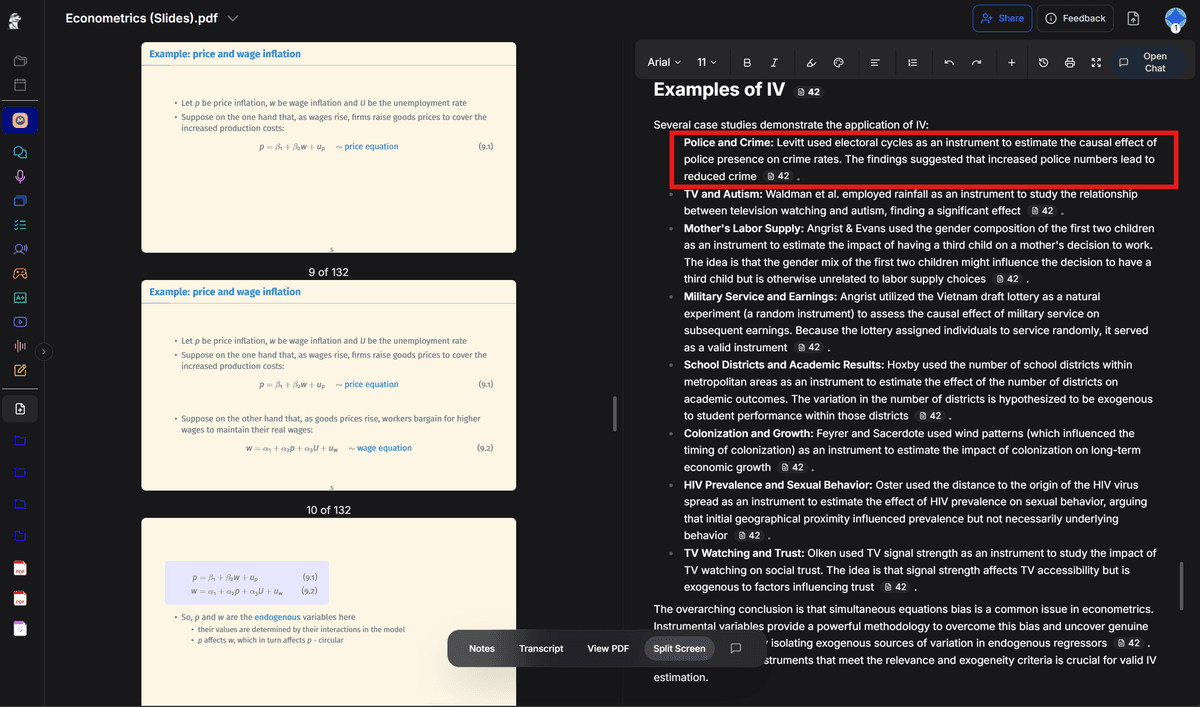
When elaborating on examples of using instrumental variables (variables used in place of those correlated with the error term), Turbo automatically sorted the examples into a table with each row a different example and each column an important factor of the case. StudyFetch, instead, glossed over important aspects of the cases such as the endogenous variable or the example's necessity for instrumenting a variable.
Verdict: Turbo delivers cleaner notes across subjects and reliable access across devices. StudyFetch struggled with technical detail, often omitting key points like equations or overexplaining legal arguments.
V. Flashcards
In terms of studying the material, both tools offer a flashcard feature.
Turbo's flashcards are simple and auto-generated immediately after note creation. Its "Learn Mode" lets you:
- Sort cards into "New," "Learning," and "Mastered" buckets
- Ask the AI deeper questions
- Organize cards by changing the visible side, shuffling, exporting, and adding cards to "Favorites"
Overall, Turbo's cards were short and punchy, which works well for humanities and concept-heavy classes. But they didn't always include equations for more quantitative coursework.
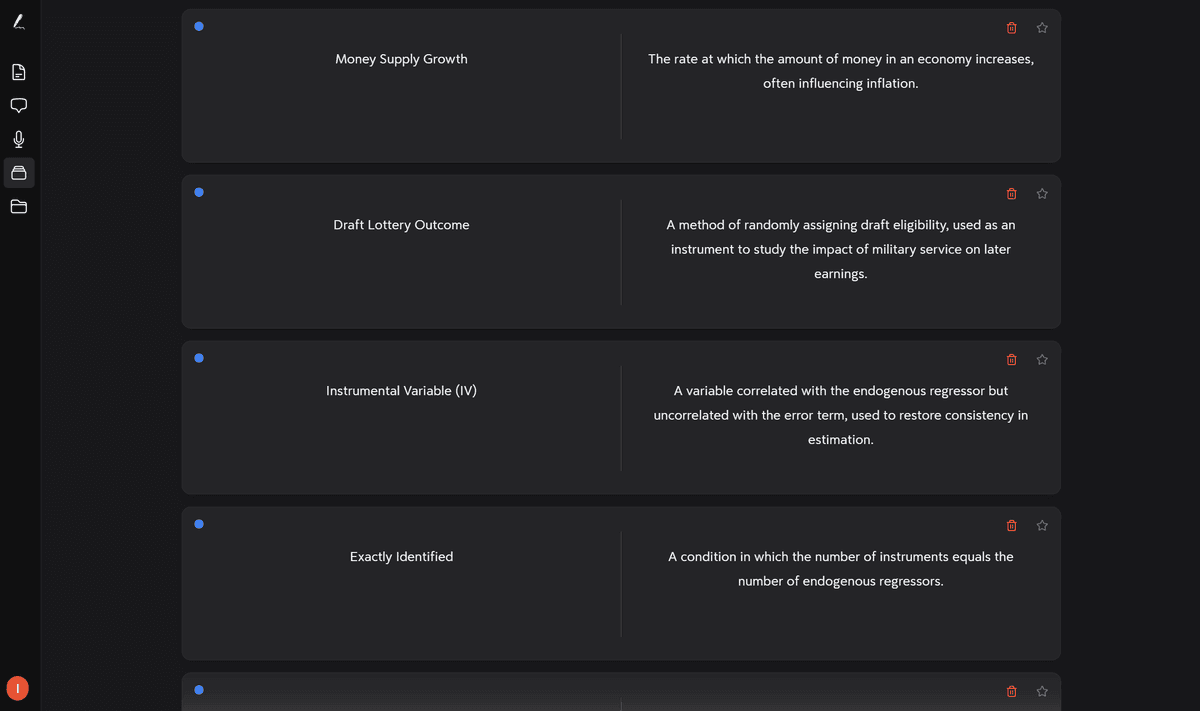
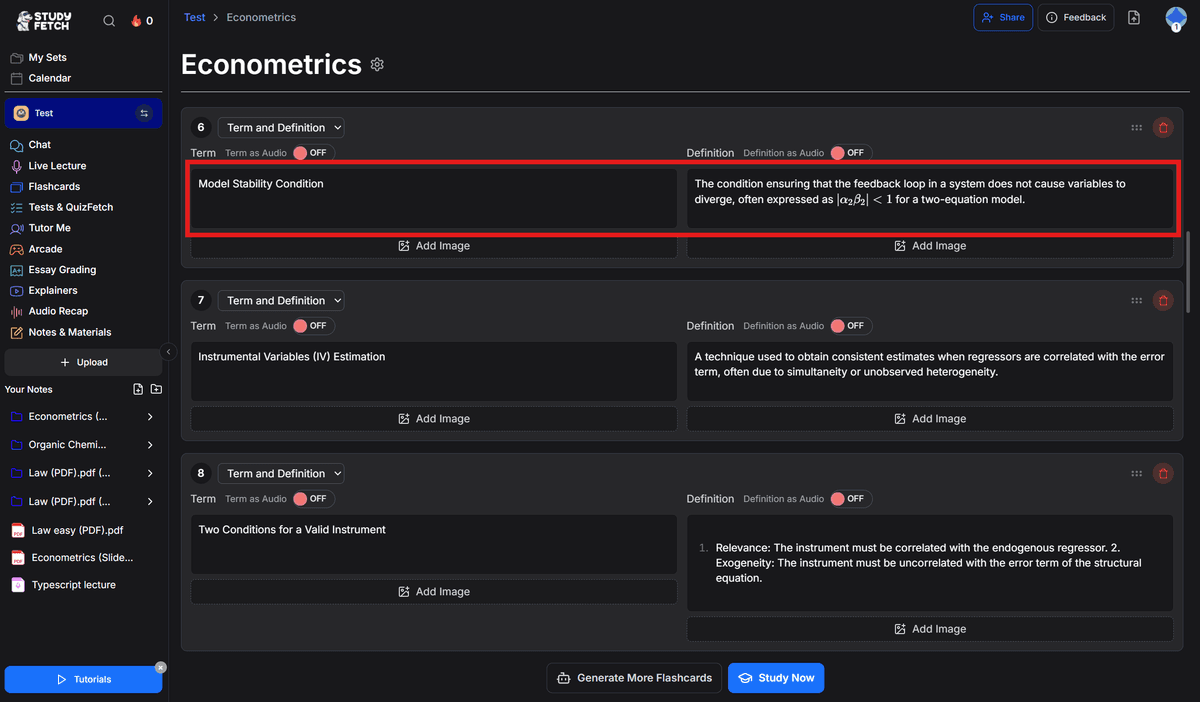
StudyFetch's flashcards went deeper. The econometrics set included formulas, assumptions, and technical definitions. One key assumption in the econometrics slides is the stability condition, |α₂β₂| < 1, which StudyFetch included and Turbo did not.
Turbo Flashcards
StudyFetch Flashcards
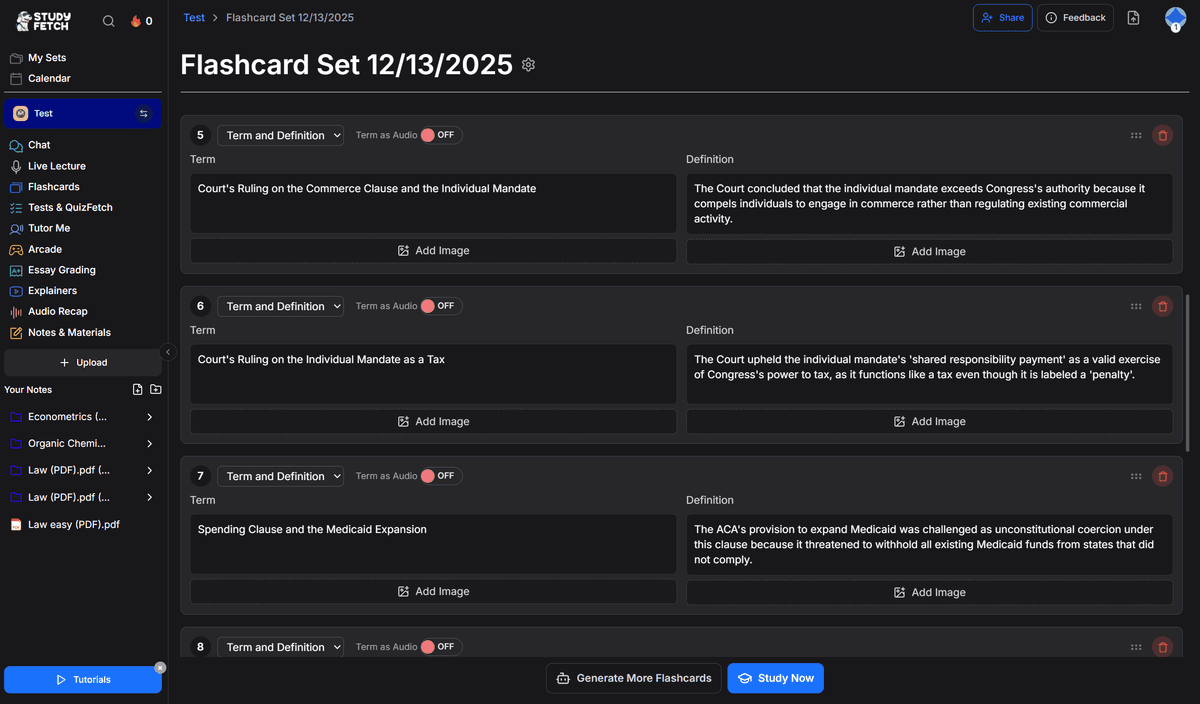
Similarly, StudyFetch's flashcards for constitutional law were more case-specific, explicitly stating the rulings and results of the given cases.
Turbo Flashcards

StudyFetch Flashcards
There is a flaw with StudyFetch's flashcard generation from audio, however. The platform failed to retrieve the computer science recording and generate flashcards. After selecting the transcript and requesting flashcards on mobile, the app returned the message "No material content found."
Below is a subject-by-subject comparison of flashcard performance across both tools:
| Subject | Turbo | StudyFetch |
|---|---|---|
| Computer Science | Strong | (Failed to Generate) |
| Chemistry | Concept-focused | More detail, includes timestamps |
| Legal Studies | General legal clauses | More case-specific |
| Economics | Missed formulas | Technically superior |
Verdict: Turbo's flashcards are quick, clean, and reliable. If you want a deeper dive and don't mind occasional glitches, go with StudyFetch's flashcards. This round is close but we'll give it to StudyFetch.
VI. AI Chat, Quizzes & Misc. Features
Both tools also offer quiz and chat features tied to the notes and flashcards. Both AI assistants allow users to "talk" to their notes and ask questions about a case or concept, providing solid answers.
When working with the econometrics lecture slides, I asked both chatbots to "explain how you go from the structural form to the reduced form of a price/wage equation" and "explain the difference between OLS and IV estimators." They both gave the 'correct' answer, clearly tying answers back to the uploaded lecture slides.
Verdict: Both tools tie for this category, so we'll give each a point.
VII. Feature Depth vs. Bloat
Plenty of software tools and devices add features to make their products appear sophisticated. So which tool gives you actual value?
Turbo sticks to the essentials with notes, flashcards, a chatbot, quizzes, and a listening mode. It's lean, but everything it does offer works beautifully without forcing users to navigate dozens of pages.
StudyFetch, on the other hand, offers tons of features. These include an AI chatbot, flashcards, a note-sharing community, a study library, practice tests, study games, leaderboards, avatars, syllabi slots, progress tracks, and many customizable options across features.
Some are helpful, but others seem half-baked. I played a jump game based on the econometrics slides, which asked me questions like "Who is the founder of econometrics?" or "What is the primary focus of econometrics?" despite being supposedly based on a technical slide deck.
The game felt completely disconnected from the actual material.
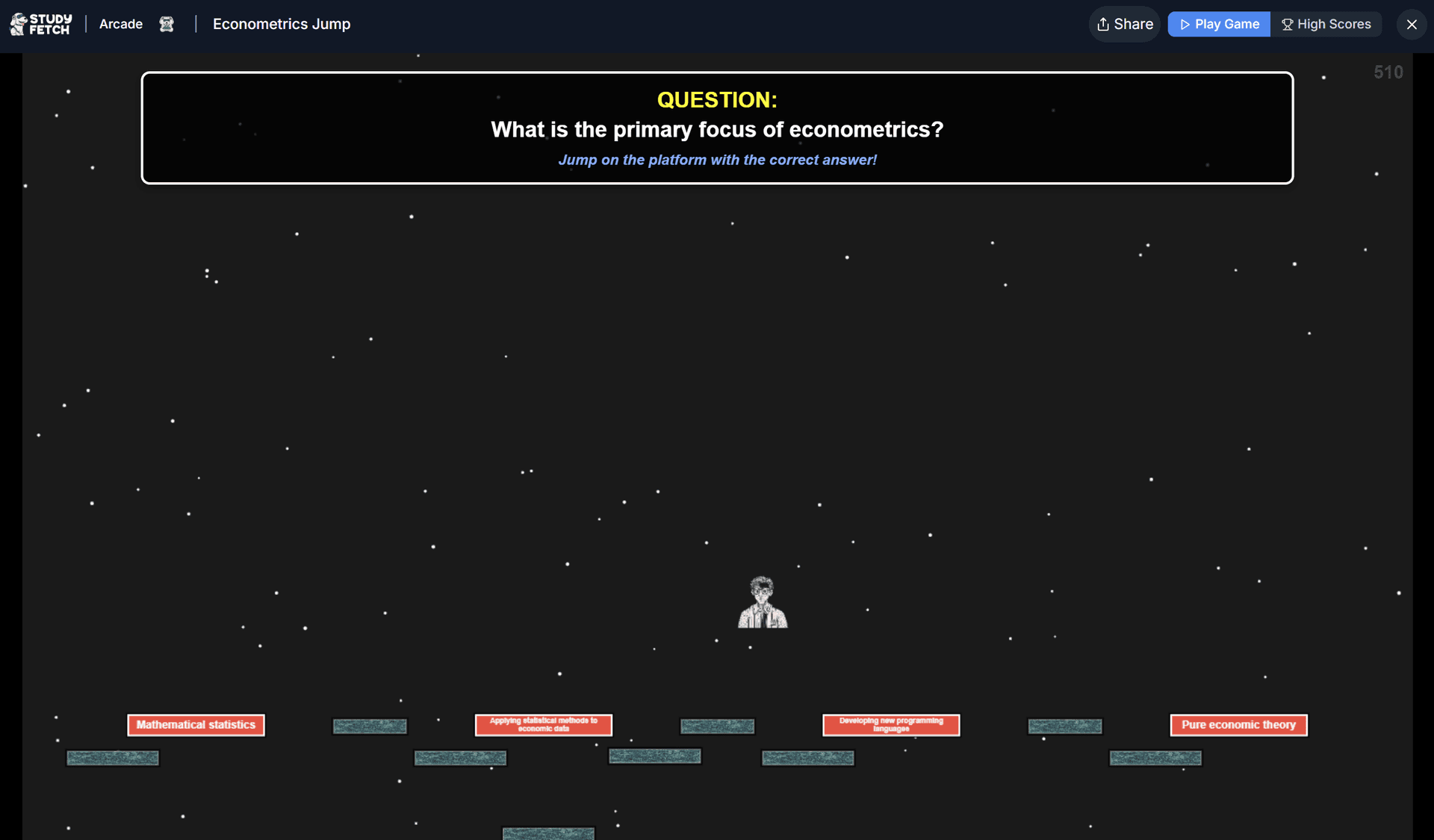
Worse, many of these features link to separate pages or menus that do not link back to the original page. You end up constantly switching tabs or clicking back and forth, which interrupts focus and distracts from studying.
Turbo's Sidebar

StudyFetch's Sidebar

Many StudyFetch users have come to the same conclusion with buggy features and friction using the site:
"Good concept, but bad implementation. Many central functions work only from time to time or simply don't work."
— Furcio, Dec 9, 2025
"Everything on this platform loads very slow and the organization of it all is horrible."
— Rahmatoullah, Oct 24, 2025
"The user interface is clunky, laggy, and stacked with frustrating bugs."
— Racks, June 16, 2025
"Only two days later, I could no longer upload documents, which made most features unusable."
— Zana, Jul 7, 2025
Verdict: Turbo is clean while many of StudyFetch's features feel like fluff. We give this category to Turbo. The final tally is below.
VIII. Conclusion
After testing both side by side with real coursework, the tradeoffs became clear. Turbo excels at clarity, aesthetics, and simplicity. StudyFetch offers depth in specific areas like flashcards, but the experience often feels cluttered and confusing.
Both tools help, but they serve different students. If you want a clean system that supports thinking, retention, and flexibility across subjects, Turbo delivers more consistently.
For me, the deciding factor was which tool I trusted during a hard week with dense material and limited time.
Turbo felt supportive while StudyFetch felt noisy. But at the end of the day, the better tool is the one that fades into the background and helps YOU learn faster, think clearer, and spend less time fighting your study system.
Ishan Chawla
Student, Northwestern University